

Preparing Your Child for a Technology-Rich Classroom: What Parents Should Know
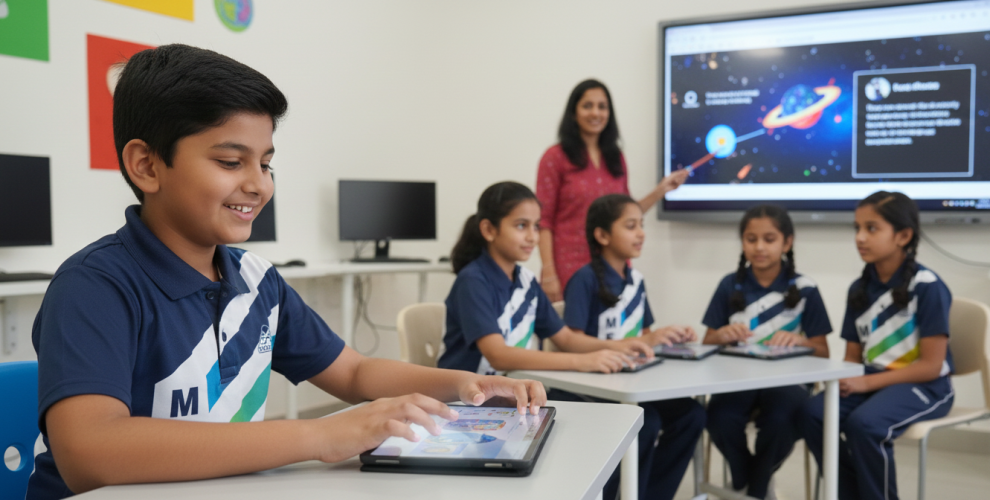
The modern classroom looks vastly different from the educational spaces many parents remember from their own childhoods. Interactive whiteboards have replaced chalkboards, tablets complement textbooks, and students collaborate through digital platforms as naturally as they once passed notes on paper. This technology-rich learning environment offers unprecedented opportunities for personalized, engaging education—but it also requires thoughtful preparation and partnership between schools, parents, and students.
At Mentor International School in Hadapsar, we embrace educational technology as a powerful tool for enhancing learning while recognizing that successful technology integration requires more than just providing devices—it demands developing digital literacy, establishing healthy habits, and maintaining open communication between home and school.
Understanding the Technology-Rich Classroom
Today’s technology-enabled classrooms represent a fundamental shift in how education is delivered and experienced. Technology creates engagement, incorporates different learning styles, improves collaboration, prepares for the future, and connects teachers with students in ways that were previously impossible.
What Does Technology Integration Look Like?
In modern classrooms, technology serves multiple purposes beyond simply replacing traditional tools. Students use interactive games to build fundamental skills, engage with multimedia content that makes learning more enjoyable, and access adaptive learning platforms that cater to individual learning paces and needs.
Educational technology can make learning more interactive and engaging through multimedia content, gamification, and interactive simulations, capturing students’ interest more effectively than traditional methods. Classes might include virtual field trips to historical sites, science simulations that allow students to manipulate variables in experiments, or collaborative projects where students across different locations work together in real-time.
The Benefits of Technology in Learning
Research consistently demonstrates significant benefits when technology is thoughtfully integrated into education. A 2023 study discovered that technology not only makes learning more fun and engaging for students, but also encourages them to invest more effort in their studies as time goes on.
Even subjects that students deem challenging or boring can become more interesting with virtual lessons, through a video, or when using a tablet. This increased engagement translates into better learning outcomes, with students demonstrating improved comprehension, retention, and application of concepts.
The Essential Skills: Building Digital Literacy
As parents, one of the most important things you can do is help your child develop strong digital literacy skills—the ability to use technology effectively, responsibly, and critically.
Digital literacy encompasses far more than simply knowing how to use a device or application. Strong digital literacy includes both the technical skills required to use digital tools and an understanding of online etiquette, respect for intellectual property rights, and awareness of the permanence of one’s digital footprint.
Students need skills to navigate online information, recognize AI-driven recommendations, and understand how digital systems shape their experiences. In an increasingly AI-driven world, children must learn not just to consume digital content but to question it, evaluate its credibility, and understand the algorithms that influence what they see.
Critical Thinking in the Digital Age
One of the most crucial components of digital literacy is developing critical thinking about online information. Help children understand that not everything online is true or safe, teaching them to question sources, avoid clicking unknown links, and be cautious when interacting with strangers.
Encourage your child to evaluate sources critically, question online information, and recognize how algorithms influence content. Discuss how search results are ranked, how social media feeds are curated, and how advertisements target specific audiences. These conversations build the analytical skills necessary for navigating the digital world responsibly.
At the heart of digital literacy lies the concept of digital citizenship—understanding one’s rights and responsibilities in online spaces. Parents can engage in open dialogues with their adolescents about the importance of responsible online behavior, the consequences of cyberbullying, and the need to maintain a positive online presence.
Teaching digital citizenship includes helping children understand that their online actions have real-world consequences. Content posted online can be permanent, even when deleted, and can affect future educational and career opportunities. Help your child develop the judgment to pause before posting, consider how their words might affect others, and understand the difference between public and private communication.
Establishing Healthy Screen Time Habits
While technology offers tremendous educational benefits, excessive screen time can negatively impact children’s development, making it essential to establish balanced habits from the start.
Understanding Screen Time Guidelines
Health organizations provide clear recommendations for appropriate screen time by age. According to the Indian Academy of Pediatrics and World Health Organization:
Children under 2 years should have no screen time, with the exception of occasional video calls with relatives. At this stage, interaction with caregivers and physical exploration are crucial for development.
Children aged 2 to 5 years should be limited to a maximum of 1 hour per day of screen time. Choose high-quality content and watch together to make it more interactive and meaningful.
Children above 5 years should not exceed 2 hours of recreational screen time per day. Educational screen use should be balanced with sufficient breaks, outdoor activity, and appropriate screen hygiene practices.
Balancing Educational and Recreational Screen Time
It’s important to distinguish between educational screen time required for learning and recreational screen time. For older children and adolescents, it is important to balance screen time with other activities that are required for overall development.
Most parents (57 percent) encourage non-screen activities to balance screen time, with others explaining risks or setting explicit limits. The goal is not to eliminate screens but to ensure they don’t crowd out physical activity, face-to-face social interaction, creative play, and adequate sleep.
Creating a Healthy Tech Environment at Home
Establish designated tech-free zones and times in your home. Consider keeping devices out of bedrooms to ensure quality sleep, establishing device-free family meal times to encourage conversation, and creating homework spaces that minimize digital distractions when deep concentration is needed.
When sedentary with devices, engaging in reading and storytelling with a caregiver is encouraged as an alternative that promotes language development and bonding without screens.
Online Safety and Cybersecurity
Because school-age children are starting to be independent online and might go online unsupervised, there are more online safety risks for them than there are for younger children.
Students, especially younger ones, often lack the knowledge to recognize online threats. Without proper guidance, they may fall prey to phishing scams, overshare personal information, or interact with strangers online. Parents must understand these risks to guide their children effectively.
The main categories of online risks include:
Content risks: Exposure to inappropriate material including violence, sexual content, or age-inappropriate information.
Contact risks: Interaction with strangers who may have harmful intentions, including predators, scammers, or cyberbullies.
Conduct risks: Engaging in risky behaviors such as cyberbullying others, sharing inappropriate content, or participating in harmful online challenges.
Privacy risks: Inadvertently sharing personal information that could compromise safety or be misused by others.
Teaching Privacy and Personal Information Protection
Show your child how to take care with privacy and personal information. Explain that information like full names, addresses, phone numbers, school names, and locations should never be shared publicly online or with strangers.
Ask your child to check with you before filling out membership forms on gaming sites, entering online competition entry forms, and so on. Many sites collect extensive data, and children should understand the implications before agreeing to terms and conditions.
Show your child how to check the privacy settings on apps and help them understand what information different apps collect and how it’s used. This awareness empowers children to make informed decisions about which platforms to use and how to configure their privacy settings.
Good ways to help your child learn include going online together, talking about inappropriate online content, talking about appropriate online behavior, being a role model, and showing your child how to practice online safety.
Create an environment where your child feels comfortable coming to you with concerns about something they encountered online. Open conversations about technology help students develop judgment and resilience—skills essential in an AI-driven world.
Parental Controls and Monitoring
While building trust and teaching digital literacy are paramount, appropriate monitoring and parental controls provide additional layers of protection.
Implementing Technical Safeguards
Check privacy settings and location services on apps and devices, use parental controls and safe search settings on browsers, apps, search engines and YouTube. These tools filter inappropriate content and limit access to age-inappropriate material.
Add profiles and passcodes on pay TV and streaming services, limit camera and video functions on the devices your child uses, and switch off in-app purchases and disable one-click payment options to prevent unintended purchases or inappropriate content access.
Balancing Monitoring and Privacy
As children grow, they need increasing privacy and autonomy. The goal of monitoring is not to spy but to guide and protect. Be transparent with your child about what monitoring you’re doing and why, emphasizing that it’s about their safety rather than lack of trust.
Survey data reveals that 87% of parents support technology integration in schools to enhance learning, but approaches to monitoring vary. While 46% of parents allow moderate usage, others range from strict educational-only use (28%) to unrestricted access (6%).
Find the approach that works for your family, considering your child’s age, maturity, demonstrated responsibility, and the specific digital environments they’re accessing.
Supporting Technology Use for Learning
Technology integration is influenced by factors such as student requests, parents’ understanding of technology, school support, and teacher performance both directly and indirectly.
Understanding Your Child’s Technology Needs
Student requests are the variable that has the highest effect on technology integration carried out by parents. When your child comes home needing to complete an assignment using specific technology, having access to necessary tools becomes essential for their academic success.
Be prepared to support assignments that require internet research, digital submissions, collaborative online work, video creation, coding platforms, or specialized educational applications. Understanding that these are legitimate learning tools rather than distractions helps you support your child’s education effectively.
Developing Your Own Technology Skills
Technology integration is also influenced by parents’ understanding of technology. If you’re unfamiliar with the platforms and tools your child uses for learning, take time to learn about them.
Ask your child to show you what they’re working on and explain how the technology supports their learning. This serves multiple purposes: you become more knowledgeable about the tools, you show interest in your child’s education, and you gain insight into how they’re using technology.
Creating an Effective Learning Environment
Establish a dedicated homework space with reliable internet access, appropriate lighting, minimal distractions, and ergonomic setup for comfortable device use. Ensure your child has the necessary equipment, whether school-provided or personal, properly charged and functioning.
The technology skills students use beyond your class are transferable to an academic setting. Help your child see connections between the digital skills they use recreationally and those applicable to academic work.
The Role of Communication Between Home and School
Successful technology integration requires strong partnership between parents and schools. Survey findings show a mismatch between parents’ communication preferences and schools’ practices, highlighting the need for improved dialogue.
Understanding School Technology Policies
Familiarize yourself with your school’s policies regarding device usage, acceptable online behavior, technology expectations, and consequences for misuse. When you understand these policies, you can reinforce them at home and ensure consistency in expectations.
Staying Connected with Teachers
Maintain open communication with your child’s teachers about their technology use and learning progress. Ask questions like: What platforms do you use in class? How can I support technology-based assignments at home? What concerns should I watch for regarding my child’s technology use? How does technology support my child’s specific learning needs?
Teacher performance and school support have indirect effects through the student requests variable on technology integration, making these partnerships crucial for successful implementation.
Preparing for Specific Technologies
Many schools use platforms like Google Classroom that allow students to work together in real-time through shared documents and discussion forums. Familiarize yourself with these tools so you can support your child when technical issues arise.
Schools increasingly use AI-powered tools like adaptive learning platforms that adjust to individual student needs. SchoolAI provides easy-to-use “Mission Control,” which gives teachers full oversight of student interactions and real-time insights into student progress, ensuring appropriate monitoring while leveraging AI benefits.
Help your child understand that AI tools are learning aids, not shortcuts, and that developing their own thinking skills remains essential even when AI assistance is available.
Creative and Interactive Tools
Platforms for creating interactive game-like lessons make learning more engaging. Tools for video creation, digital storytelling, coding, and design allow students to demonstrate learning creatively. Support your child’s exploration of these creative outlets while ensuring technology enhances rather than replaces foundational skills.
Addressing Common Parental Concerns
“Will too much screen time harm my child’s development?”
When technology use is balanced with physical activity, face-to-face interaction, and adequate sleep, and when content is age-appropriate and educational, research suggests that technology can enhance rather than harm development. The key is intentionality and balance.
“How do I know if my child is using technology appropriately?”
Maintain open communication, use monitoring tools appropriately for your child’s age, watch for warning signs like secretive behavior or reluctance to discuss online activities, and check in regularly about what they’re doing online and who they’re interacting with.
“What if I’m not tech-savvy myself?”
Numerous resources are available to help parents develop digital literacy skills, including online courses, school-provided workshops, and community programs. Don’t hesitate to ask teachers for guidance or learn alongside your child.
“How can I limit recreational use without affecting educational use?”
Establish clear categories and time allocations for different types of screen time, use device features that distinguish educational apps from entertainment, create schedules that prioritize homework and learning time, and model healthy technology habits yourself.
Mentor International School’s Approach to Technology Integration
At Mentor International School in Hadapsar, we believe that effective technology integration enhances learning without replacing the fundamental elements of quality education—skilled teachers, meaningful relationships, hands-on experiences, and critical thinking development.
We view technology as a tool that serves learning, not an end in itself. Our approach emphasizes using technology purposefully to enhance engagement, enable personalization, facilitate collaboration, prepare students for digital futures, and expand access to information and experiences.
We ensure that technology use is developmentally appropriate, with younger students using technology primarily for building foundational skills through interactive, playful experiences, while older students engage with more sophisticated tools for research, creation, collaboration, and problem-solving.
Comprehensive Digital Citizenship Education
Our curriculum includes explicit instruction in digital citizenship, covering online safety and privacy, respectful online communication, critical evaluation of online information, understanding digital footprints, responsible social media use, and cyberbullying prevention.
These lessons aren’t isolated events but integrated throughout the curriculum, with teachers reinforcing digital citizenship principles across subjects and situations.
We carefully structure our schedules to ensure technology enhances rather than dominates learning experiences. Our approach includes regular screen breaks during the school day, balance between digital and hands-on activities, outdoor time and physical education, face-to-face collaborative work, and non-digital creative pursuits.
Parent Partnership and Support
We recognize that successful technology integration requires strong home-school partnerships. We provide regular parent workshops on educational technology, digital safety, and supporting learning at home, clear communication about technology expectations and usage, resources for monitoring and supporting home technology use, and opportunities for parents to see classroom technology in action.
Safe and Supervised Environment
Our school implements robust security measures, including secure networks with content filtering, supervised technology use with trained staff, monitored student accounts on educational platforms, clear policies and consequences for misuse, and regular technology safety education.
We use platforms that provide teachers with oversight of student interactions and real-time insights into student progress, ensuring that technology remains a tool for learning in safe, appropriate ways.
Personalized Learning Through Technology
Technology allows for adaptive learning platforms that cater to individual students’ needs and learning paces, providing tailored resources and assessments to help each student succeed. This personalization ensures that advanced students can explore deeper while struggling students receive additional support—all within the same classroom.
As you prepare your child for technology-rich learning, consider these actionable steps:
Establish clear expectations for technology use both at school and home, including when, where, and how devices should be used.
Model healthy technology habits yourself, demonstrating the balance and responsibility you want your child to develop.
Create tech-free times and spaces that prioritize family connection, outdoor activity, and offline creative pursuits.
Stay informed about the technologies your child uses, asking questions and showing genuine interest in their digital learning experiences.
Maintain open communication with both your child and their teachers about technology use, concerns, and successes.
Teach critical thinking about online information, helping your child become a discerning consumer of digital content.
Prioritize safety while gradually increasing independence as your child demonstrates responsible technology use.
Celebrate the benefits while remaining mindful of potential risks, approaching technology with informed optimism rather than fear.
The digital skills students develop today will serve them throughout their lives. The workplace of the future demands technological proficiency, digital collaboration, creative problem-solving, adaptability, and ethical use of technology—all skills that begin developing in technology-rich classrooms.
By preparing your child thoughtfully for technology integration in education, you’re not just supporting their current academic success but equipping them for future opportunities in an increasingly digital world.
Conclusion: Partnership for Success
The technology-rich classroom offers tremendous potential for engaging, personalized, effective education—but realizing this potential requires partnership between educators and parents. When schools and families work together to teach digital literacy, establish healthy habits, ensure online safety, and maintain balance, technology becomes a powerful tool for learning and development.
At Mentor International School in Hadapsar, we are committed to leveraging educational technology in ways that enhance learning while prioritizing student safety, wellbeing, and holistic development. Our approach recognizes that technology is most effective when combined with skilled teaching, meaningful relationships, hands-on experiences, and strong home-school partnerships.
When parents choose Mentor International School, they choose an institution that embraces the benefits of educational technology while maintaining the timeless elements of excellent education—caring teachers, engaged students, supportive communities, and commitment to developing the whole child.
Through thoughtful preparation, open communication, and ongoing partnership, we ensure that every child is equipped not just to use technology but to use it wisely, safely, and effectively as a tool for lifelong learning and success. In our classrooms in Hadapsar, you will find students who are not just tech-savvy but digitally literate, not just users of technology but critical thinkers about it, not just prepared for today’s digital world but ready to shape tomorrow’s. This is the promise and practice of Mentor International School’s approach to technology in education.
